Development
Information about developing overlays that use ipl-overlay-controls.
For further reference, several dependent graphics packages are open source.
We request that you do not use them verbatim in your own work.
Versioning
ipl-overlay-controls generally follows Semantic Versioning, meaning that releases are numbered using the MAJOR.MINOR.PATCH format:
- A major version will likely break compatibility with dependent graphics
- A minor version will introduce new functionality, and will work with existing graphics
- A patch version fixes issues.
Defining compatible dashboard versions
To declare what dashboard version your bundle works with, add the compatibleDashboardVersion attribute in your bundle's package.json file.
For info on declaring version ranges, refer to the readme for semver on npm.
After completing this setup process, the user will be warned about incompatible versions in the NodeCG console.
Defining compatible game versions
As of ipl-overlay-controls 4.0.0, it is possible to define what Splatoon versions your bundles are compatible with.
By default, bundles are marked as compatible with Splatoon 2.
To define a different set of compatible games for your bundle, add the following to your bundle's package.json file:
"compatibleGameVersions": ["SPLATOON_2", "SPLATOON_3"]
Defining custom intermission scenes or caster sets
By default, only three intermission "Scenes" are available - Main, teams and stages. A dependent bundle may declare additional scenes or sets of commentators (For example, as members of an analysis desk.)
- Declare
ipl-overlay-controlsas a dependent of your graphics bundle:
{
    [...]
    "nodecg": {
        [...]
        "bundleDependencies": {
            "ipl-overlay-controls": "^4.18.0"
        }
    }
}
- Declare additional scenes or caster sets within your extension code:
module.exports = (nodecg) => {
    nodecg.extensions['ipl-overlay-controls'].bundleConfigDeclarationService.declareCustomScenes(nodecg.bundleName, [
        {
            value: 'casters',
            names: {
                EN: 'Casters',
                JA: 'キャスト'
            }
        }
    ]);

    nodecg.extensions['ipl-overlay-controls'].bundleConfigDeclarationService.declareCasterSets(nodecg.bundleName, [
        {
            key: 'analysts',
            maxItems: 4,
            names: {
                EN: 'Analysts'
            }
        }
    ]);
}
Debugging the screenshot parser
By setting screenshotParser.saveBadScreenshotsToDisk to true in the bundle configuration file (<nodecg>/cfg/ipl-overlay-controls.json),
ipl-overlay-controls will save to disk screenshots that it failed to read ink colors from.
Team data
ipl-overlay-controls supports importing team data from smash.gg and Battlefy.
Read more about how to import team data
tournamentData
Replicant (Schema)
Contains information about the most recently imported tournament. Most commonly, this includes the tournament's participating teams and their players.
Monitoring this replicant is typically not required for graphics packages.
Match data
Replicants that store information about matches that have been played on stream.
activeRound
Replicant (Schema)
Contains information about the match currently in progress on the broadcast, including team names, scores, colors and games that have been played.
nextRound
Replicant (Schema)
Contains information about the match that is coming up next on the broadcast.
When showOnStream is true, the data is intended to be visible on the graphics.
Usually, the next teams are shown between rounds. Example

roundStore
Replicant (Schema)
Contains a list of rounds saved to the dashboard, including each round's name, type (best of X, play all X), stages and modes.
Monitoring this replicant is typically not required for graphics packages.
matchStore
Replicant (Schema)
Contains a list of matches that have been played during this tournament. Included is every match's teams, colors, modes, stages and more.
highlightedMatches
Replicant (Schema)
Contains a list of highlighted matches, pulled from Battlefy or smash.gg. Read more about getting highlighted matches.
Monitoring this replicant is typically not required for graphics packages.
Casters
Casters (Also known as Commentators) are the heart of a quality tournament broadcast. They help viewers understand what is happening in the match and provide an interesting perspective on the decisions made by the players make on a second-by-second basis.
casters
Replicant (Schema)
Contains information about the current casters.
A maximum of 3 casters are allowed to be shown at a time by the dashboard and schema to simplify overlay design.
currentObservers
Replicant (Schema)
Contains information about the talent currently spectating the match. May contain multiple elements, but the vast majority of events only have one observer active at a time. Graphics are welcome to ignore any observers past the 1st or 2nd item in the list if doing so is deemed appropriate.
mainShowCasters
Message (more info)
Informs graphics that they should display caster information, typically below the scoreboard or in the bottom right-hand corner of the screen.
Music
Replicants related to music. Ipl-overlay-controls allows for music to be pulled from Last.fm, or typed in manually.
nowPlaying
Contains the currently playing song.
This replicant's value is mirrored from either lastFmNowPlaying or manualNowPlaying,
depending on the value of nowPlayingSource.
musicShown
Replicant (Schema)
Boolean - Determines whether music should be shown on the overlays or not.
nowPlayingSource
Replicant (Schema)
Determines where the value for the nowPlaying replicant is currently obtained from.
Monitoring this value is not necessary for graphics.
Expected values: lastfm, manual
lastFmNowPlaying
Replicant (Schema)
Contains the currently playing song, as reported by Last.fm.
It is recommended to use nowPlaying instead of this replicant to simplify overlay development.
lastFmSettings
Replicant (Schema)
Contains the username for the Last.fm user that ipl-overlay-controls will get the currently playing song name from.
Monitoring this value is not necessary for graphics.
manualNowPlaying
Replicant (Schema)
Contains the currently playing song, as reported by the user.
It is recommended to use nowPlaying instead of this replicant to simplify overlay development.
Next Round Timer
Ipl-overlay-controls provides an interface to enter the expected start time and date for the next round, to keep viewers in the loop about the stream's status. It can be set from the "Break Screen" dashboard panel.
nextRoundStartTime
Replicant (Schema)
Contains the expected start time of the next round (as an ISO date string), and whether it should be visible on the stream or not.
Scenes
Replicants related to Scenes.
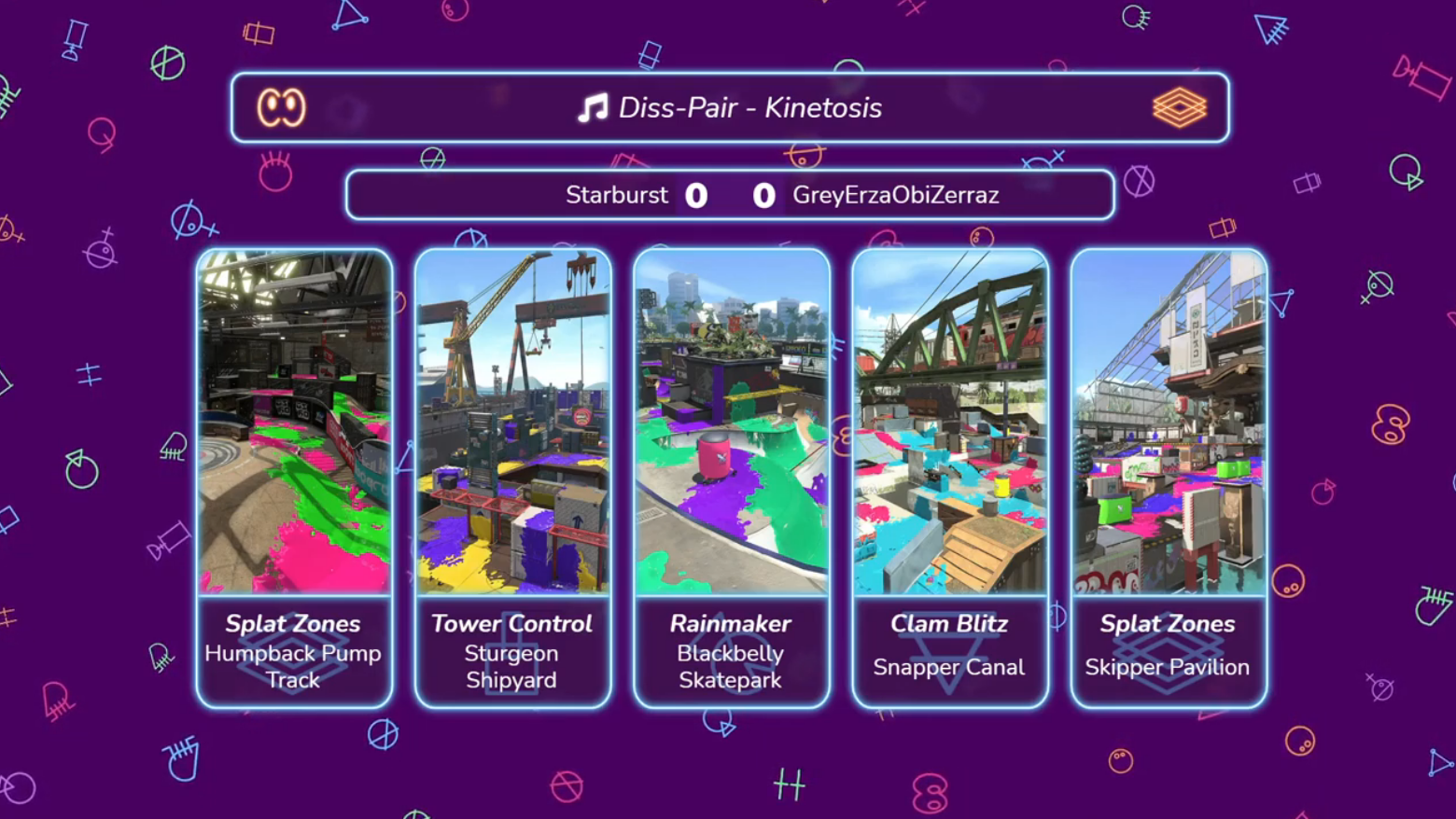
IPL's broadcast graphics are typically built with two pages: "Main" and "Break". The "Break" graphic is further split into "Scenes", each showing different information during the intermission period between matches.
activeBreakScene
Replicant (Schema)
Set from the "Break Screen" dashboard panel. Determines whether we should be showing:
- A general intermission screen ("main"),
- A screen containing information about the teams currently playing ("teams"), or
- A screen containing information about the ongoing round, including what stages and modes will be played ("stages").


mainFlavorText
Replicant (Schema)
Contains a general "Flavor text" to be displayed on a intermission graphic.
Scoreboard
The scoreboard displays what teams are playing in the ongoing match, and the match's score.
Information about the teams currently playing should be gathered from the activeRound replicant. More info
scoreboardData
Replicant (Schema)
Contains a "Flavor text" string to be shown on the scoreboard and whether the scoreboard should be visible or not.
Predictions
IPL uses Twitch Predictions to help with viewer interaction on streams. Predictions allow viewers on Twitch to bet channel points on the team they believe is going to win the next match.
predictionStore
Replicant (Schema)
Contains information on the last prediction that was requested from the Radia Production API.
The fields stored are named the same and contain the values as what is documented by Twitch Developers for Get Prediction request's data[0] object.
Radia productions
ipl-overlay-controls Accesses the Twitch Predictions API Endpoints via Radia-Productions API that acts as a middle-man handling Twitch Authentication and Broadcaster ID details.
To use this feature, configure an API URL and authorization key from the bundle configuration (More info at the readme) and set the ID of the Discord server to import casters from through the "Settings" panel in the IPL Setup workspace. After setup is completed, the Predictions panel will show its functions if the Discord Guild is supported.
Currently, the code required in Radia-Productions API for this function is not publicly accessible. If you would like access to this system you can contact vlee489#5801 via Discord for queries on access to this section of Radia-Productions.
Assets
ipl-overlay-controls has some commonly used game assets for dependent bundles to use.
assetPaths
Replicant (Schema)
Intended to be read-only; contains stageImages, a map of stage names to the paths of their respective images. Only changes when the game version is changed.
Brackets
ipl-overlay-controls allows importing bracket data from supported tournament platforms, powered, by tourneyview.
An example of a bundle including bracket rendering support is sj-overlays.
bracketData
Replicant (No Schema)
Contains imported bracket data. Can be consumed by the @tourneyview/renderer package.